


图表中如何自定义 tooltip 的位置,偏移量?
问题描述
我在使用 VChart 图表时,遇到了图表提示框与鼠标指针距离很近的问题,这样一来在高分辨率的大屏幕上鼠标指针放大后可能会遮挡提示框,有没有什么办法能解决这个问题?

解决方案
VChart 图表已经提供了对应的功能,你只需要在图表的 spec 里设置 tooltip.offset 即可。官网上有对应的配置文档。
https://visactor.io/vchart/option/barChart#tooltip.offset
代码示例
spec.tooltip.offset = {
  x: 40,
  y: 40
};
结果展示
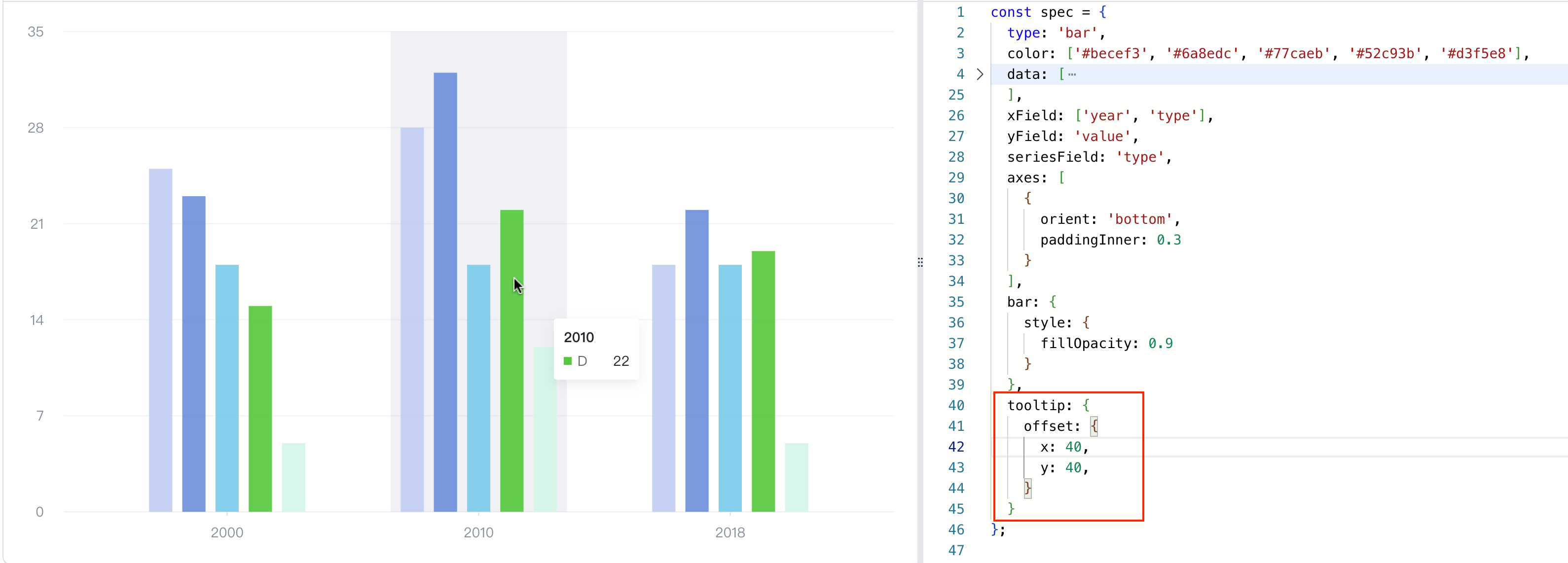
Demo: https://codesandbox.io/s/tooltip-offset-mns4gl?file=/src/index.ts
相关文档
tooltip option:https://visactor.io/vchart/option/barChart#tooltip.offset
github:https://github.com/VisActor/VChart
Tooltip tutorials: https://www.visactor.io/vchart/guide/tutorial_docs/Chart_Concepts/Tooltip
Tooltip demos:https://www.visactor.io/vchart/demo/tooltip/custom-mark-tooltip